前言
在移动应用设计与开发领域,深色模式已从可选功能升级为用户体验的核心标配。它不仅能适配夜间使用场景、降低屏幕功耗与视觉疲劳,更能彰显应用的设计质感与人性化考量,成为衡量产品成熟度的重要指标。
本文聚焦手机应用开发中的深色模式适配实践,从设计原则、色彩体系构建、代码实现逻辑等维度展开解析,结合实际开发中的常见问题与优化方案,为开发者提供一套可落地的适配思路与技术参考,助力打造兼顾视觉体验与用户需求的高品质应用。
粗暴不适配
最粗暴的方法就是不适配,强制写死为亮色(浅色)模式.
在Ability 的 onCreate 方法中
1
2
3
| this.context
.getApplicationContext()
.setColorMode(ConfigurationConstant.ColorMode.COLOR_MODE_LIGHT);
|
这样,即使我们引用了一些系统资源,也不会在用户开启深色模式后随着改变。
适配
颜色适配
需要将之前硬编码在组件中的色值提取到 color.json文件中。
- 在
base/element/color.json定义浅色模式颜色
- 在
dark/element/color.json定义深色模式同名颜色
- 通过
$r('app.color.resource_name')引用资源
这样在切换深色模式时,系统会根据当前模式自动匹配对应目录下的颜色值。
比如,在base/element/color.json文件中
1
2
3
4
5
6
7
8
9
10
11
12
13
14
15
16
17
18
19
20
| {
"color": [
{
"name": "page_background_color",
"value": "#ffffff"
},
{
"name": "text_desc_color",
"value": "#999999"
},
{
"name": "text_subtitle_color",
"value": "#666666"
},
{
"name": "text_title_color",
"value": "#333333"
}
]
}
|
在dark/element/color.json文件中
1
2
3
4
5
6
7
8
9
10
11
12
13
14
15
16
17
18
19
20
| {
"color": [
{
"name": "page_background_color",
"value": "#000000"
},
{
"name": "text_desc_color",
"value": "#666666"
},
{
"name": "text_subtitle_color",
"value": "#999999"
},
{
"name": "text_title_color",
"value": "#cccccc"
}
]
}
|
然后在代码引用
1
2
3
4
5
6
7
8
9
10
11
| Text(
'在 resource 文件夹下新建 dark/element/color.json文件,同时在该文件中配置和 base/element/color.json文件中相同的颜色名称和不同的颜色值',
)
.fontSize(14)
.fontColor($r('app.color.text_desc_color'));
Text("在页面中应用配置文件中的色值,例如$r('app.color.text_title_color')")
.fontSize(14)
.fontColor($r('app.color.text_desc_color'));
Text('在手机中切换颜色模式,再返回应用')
.fontSize(14)
.fontColor($r('app.color.text_desc_color'));
|
媒体图片资源适配
静态图片适配:在 base/media 和 dark/media 目录放置同名图片文件,深色模式下系统优先加载 dark 目录的图片。
对于 svg 格式的图片,我们还可以使用 Image 组件的fillColor属性根据当前的颜色模式填充不同的颜色已达到适配的目的,但对于 svg 图片来讲,这个属性不是太好用,还不如再设计一张深色模式的svg 图片来的方便。
1
2
3
4
5
6
7
8
9
10
| Row() {
Image($r('app.media.color_mode_icon')).width('50%')
Column() {
Image($r('app.media.color_mode_icon_svg')).height('50%').objectFit(ImageFit.Contain)
Image($r('app.media.color_mode_icon_svg'))
.height('50%')
.fillColor($r('app.color.text_subtitle_color'))
.objectFit(ImageFit.Contain)
}.height(px2vp(1024)).width('50%').justifyContent(FlexAlign.Start)
}.width('100%').alignItems(VerticalAlign.Top)
|
状态栏适配
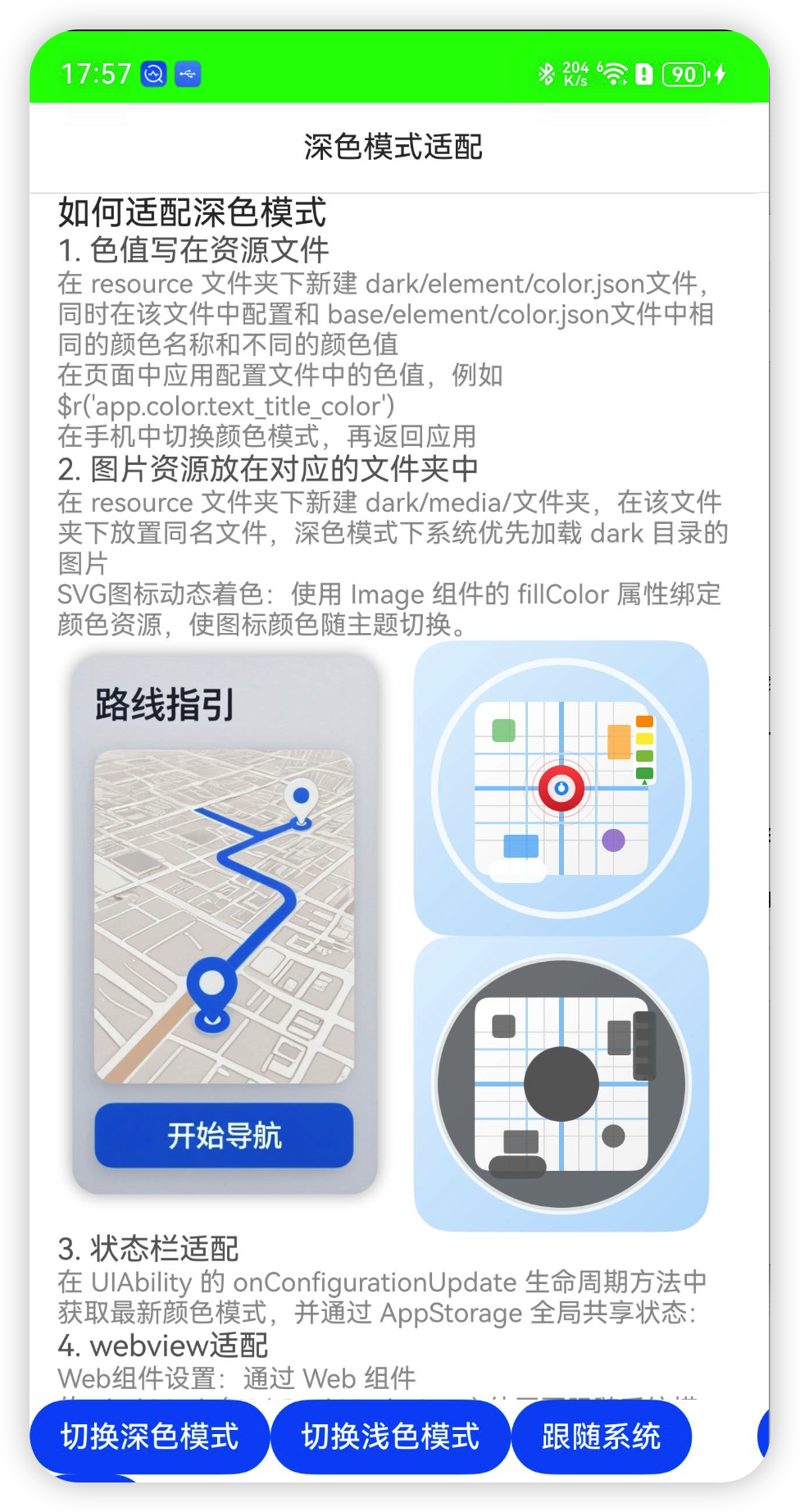
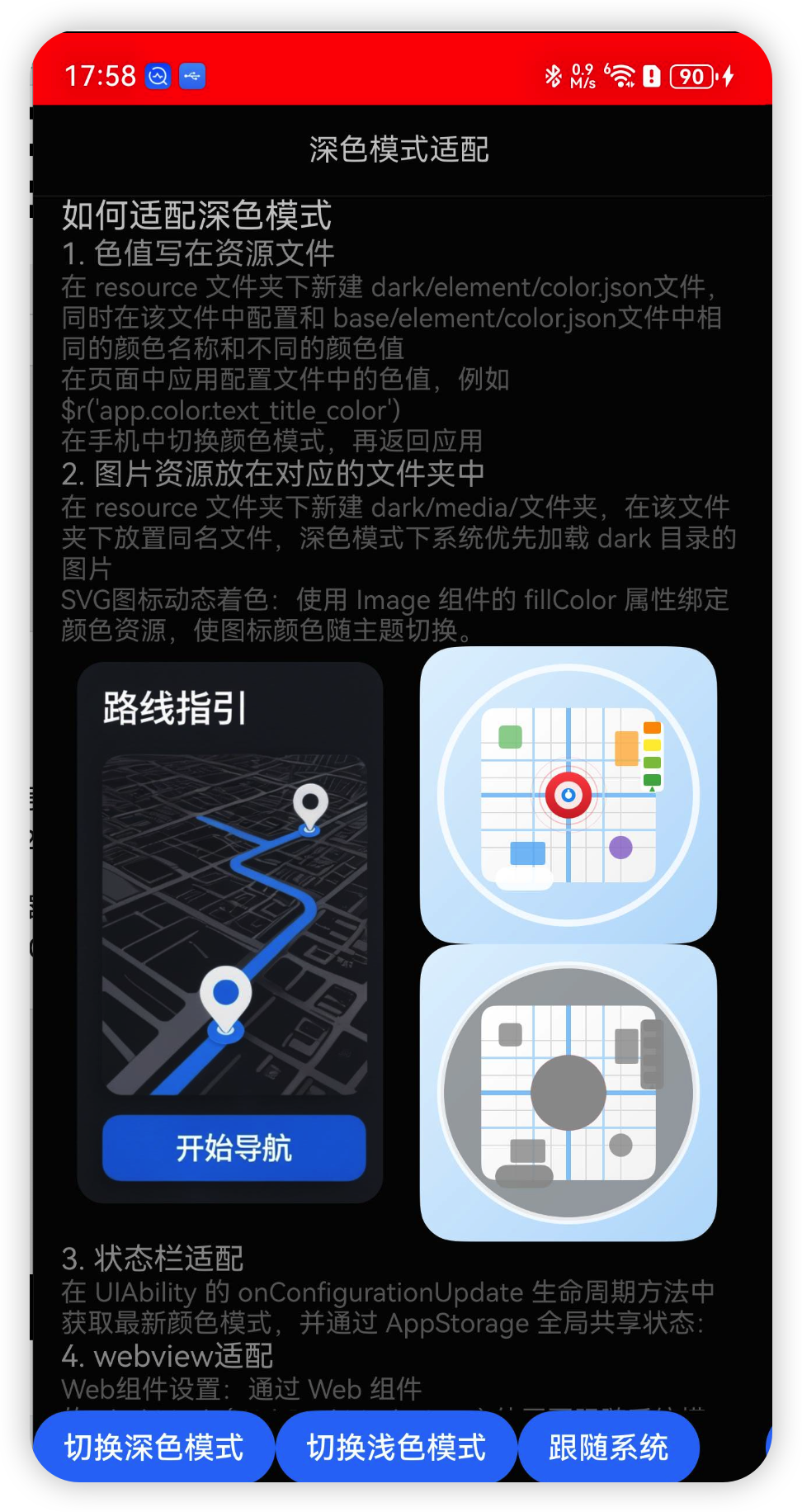
在 Ability 的onConfigurationUpdate回调中判断当前颜色模式,设置不同的状态栏颜色.
1
2
3
4
5
6
7
8
9
10
11
12
13
14
15
16
17
18
19
20
21
22
23
24
25
26
27
28
29
30
|
onConfigurationUpdate(newConfig: Configuration): void {
  this.setColorMode(newConfig.colorMode == ConfigurationConstant.ColorMode.COLOR_MODE_DARK)
}

  setColorMode(isDark: boolean) {
  if (isDark) {
    window.getLastWindow(this.context).then((win) => {
      console.error('设置状态栏为深色模式')
      win.setWindowSystemBarProperties({
        statusBarColor: "#ff0000",
        statusBarContentColor: "#000000",

      }).catch((error:BusinessError) => {
        console.error('设置状态栏为深色模式 出错 ' + error.message)
      })
    })
  } else {
    window.getLastWindow(this.context).then((win) => {
      console.error('设置状态栏为浅色模式')
      win.setWindowSystemBarProperties({
        statusBarColor: "#00ff00",
        statusBarContentColor: "#ffffff",

      }).catch((error:BusinessError) => {
        console.error('设置状态栏为浅色模式 出错 ' + error.message)
      })
    })
  }
}
|
当然也可以在onWindowStageCreate回调的windowStage.loadContent方法中判断一下当前的颜色模式,来设置初始状态
1
2
3
4
5
6
| windowStage.loadContent('pages/Index', (err) => {
this.setColorMode(
this.context.config.colorMode ==
ConfigurationConstant.ColorMode.COLOR_MODE_DARK,
);
});
|
webview适配
Web组件设置:通过 Web 组件的 .darkMode(WebDarkMode.Auto) 使网页跟随系统模式,或手动设置 .darkMode(WebDarkMode.On/Off)2。
强制深色转换:使用 .forceDarkAccess(true) 对未适配深色的网页进行色值算法转换(需注意部分颜色可能不符合预期)。
设置颜色模式
我们也可以通过代码的方式指定当前 app 使用哪种颜色模式
1
2
3
4
5
6
7
8
9
10
11
12
13
14
15
16
17
18
| Button('切换深色模式').onClick((_) => {
this.getUIContext()
.getHostContext()
?.getApplicationContext()
.setColorMode(ConfigurationConstant.ColorMode.COLOR_MODE_DARK);
});
Button('切换浅色模式').onClick((_) => {
this.getUIContext()
.getHostContext()
?.getApplicationContext()
.setColorMode(ConfigurationConstant.ColorMode.COLOR_MODE_LIGHT);
});
Button('跟随系统').onClick((_) => {
this.getUIContext()
.getHostContext()
?.getApplicationContext()
.setColorMode(ConfigurationConstant.ColorMode.COLOR_MODE_NOT_SET);
});
|
效果
源码
github: https://github.com/huangyuanlove/HelloArkUI/blob/main/entry/src/main/ets/pages/playground/dark_theme/DarkThemeModelPage.ets
gitcode: https://gitcode.com/huangyuan_xuan/HelloArkUI/blob/main/entry/src/main/ets/pages/playground/dark_theme/DarkThemeModelPage.ets